> ## Documentation Index
> Fetch the complete documentation index at: https://docs.dintero.com/llms.txt
> Use this file to discover all available pages before exploring further.
# Payment link by SMS or push
> Send a Dintero Checkout payment link by SMS or push notification using payment profile settings, payment-link configuration, or the Checkout API.
In some cases you might want to send an SMS to the customer with a link to the checkout when the
session is created.
There are several ways to send SMS-messages when creating a payment session:
* Enable SMS in Payment link in Backoffice
* Enable SMS in payment profile via Backoffice
* Enable via the API
SMS messages are not sent for test sessions.
## Enable SMS in Payment link in Backoffice
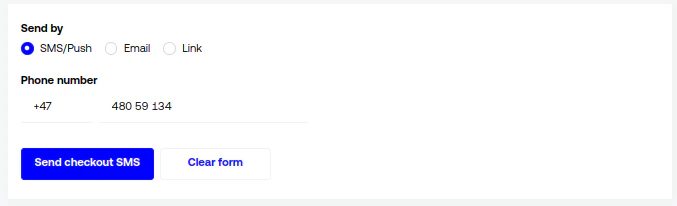
To send an SMS when using the Payment link in Backoffice, choose **Send by** → **SMS/Push** and specify the phone
number.
 ## Enable SMS in payment profile via Backoffice
If you're using payment profiles, SMS is quite easy to turn on. Simply open Backoffice and go
to **Settings** → **Payment profiles**.
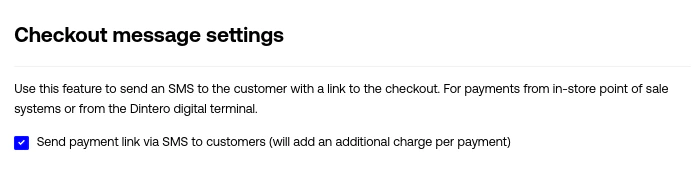
Choose your payment profile from the list (or create a new one), click edit and tick the box that says **"Send payment
link via SMS
to customers"**. Save the payment profile.
## Enable SMS in payment profile via Backoffice
If you're using payment profiles, SMS is quite easy to turn on. Simply open Backoffice and go
to **Settings** → **Payment profiles**.
Choose your payment profile from the list (or create a new one), click edit and tick the box that says **"Send payment
link via SMS
to customers"**. Save the payment profile.
 Now, when creating a session with this payment profile, your customer will receive an SMS.
## Enable SMS via the API
When using the API, you can enable SMS either through payment profiles or directly when creating the session.
* [Creating payment profile](/checkout-api/profiles/admin_session_profile_post)
* [Editing payment profile](/checkout-api/profiles/admin_session_profile_details_put)
* [Creating a session](/checkout-api/session/checkout_session_post)
To create payments with a payment profile,
use [Create checkout session from profile](/api-reference/session/checkout_session_profile_post)
.
For each of these cases, extend the request body with the following fields:
```json theme={null}
{
"configuration": {
"publish": [
{
"type": "checkout-link",
"channel": "sms"
}
]
}
}
```
## Direct push messages instead of SMS
For the following payment types, we support direct push messages:
* Vipps
* Swish
* MobilePay
To send push payments instead of SMS-messages for one of these payment types, these conditions must be met:
* The session should only contain that single payment type
* Publish is configured as the example above.
Now, when creating a session with this payment profile, your customer will receive an SMS.
## Enable SMS via the API
When using the API, you can enable SMS either through payment profiles or directly when creating the session.
* [Creating payment profile](/checkout-api/profiles/admin_session_profile_post)
* [Editing payment profile](/checkout-api/profiles/admin_session_profile_details_put)
* [Creating a session](/checkout-api/session/checkout_session_post)
To create payments with a payment profile,
use [Create checkout session from profile](/api-reference/session/checkout_session_profile_post)
.
For each of these cases, extend the request body with the following fields:
```json theme={null}
{
"configuration": {
"publish": [
{
"type": "checkout-link",
"channel": "sms"
}
]
}
}
```
## Direct push messages instead of SMS
For the following payment types, we support direct push messages:
* Vipps
* Swish
* MobilePay
To send push payments instead of SMS-messages for one of these payment types, these conditions must be met:
* The session should only contain that single payment type
* Publish is configured as the example above.