> ## Documentation Index
> Fetch the complete documentation index at: https://docs.dintero.com/llms.txt
> Use this file to discover all available pages before exploring further.
# Create a card token
> Create a Dintero card token either in advance with a zero-amount setup or during a regular purchase, ready to be reused for later customer or merchant payments.
There are two ways of creating a card token, either in advance, without withdrawing any money, or during a purchase process.
### Creating token in advance
To store a token without performing a payment, do the following:
#### Authentication
To authenticate, you create a [Checkout API client] and use the credentials to
[Create an access token]. The same client can be used for Sandbox mode and production.
For all requests to the API set the following header:
```
Authorization: Bearer {access_token}
```
[Checkout API client]: /docs/checkout/checkout-client
[Create an access token]: /docs/checkout/checkout-client#authentication
#### Create token session
With the access token, call [Payment token session][payment token session] with
this body:
```json theme={null}
{
"session": {
"order": {
"currency": "NOK",
"merchant_reference": "order-number"
},
"url": {
"return_url": "https://example.com/accept",
"callback_url": "https://example.com/callback?method=GET",
"merchant_terms_url": "https://example.com/terms.html"
},
"customer": {
"email": "john.doe@example.com",
"phone_number": "+4799999999"
}
},
"token_provider": {
"payment_product_type": "payex.creditcard",
"token_types": ["payment_token", "recurrence_token"]
}
}
```
```json theme={null}
{
"session": {
"order": {
"currency": "NOK",
"merchant_reference": "order-number"
},
"url": {
"return_url": "https://example.com/accept",
"callback_url": "https://example.com/callback?method=GET",
"merchant_terms_url": "https://example.com/terms.html"
},
"customer": {
"email": "john.doe@example.com",
"phone_number": "+4799999999"
}
},
"token_provider": {
"payment_product_type": "bambora.creditcard",
"token_types": ["payment_token"]
}
}
```
```json theme={null}
{
"session": {
"order": {
"currency": "NOK",
"merchant_reference": "order-number"
},
"url": {
"return_url": "https://example.com/accept",
"callback_url": "https://example.com/callback?method=GET",
"merchant_terms_url": "https://example.com/terms.html"
},
"customer": {
"email": "john.doe@example.com",
"phone_number": "+4799999999"
}
},
"token_provider": {
"payment_product_type": "dintero_psp.creditcard",
"token_types": ["payment_token"]
}
}
```
The response will look like this:
```json theme={null}
{
"id": "T11223445.5cyWnV68vzJ1kYjZPrKWWm",
"url": "https://checkout.test.dintero.com/v1/view/T11223445.5cyWnV68vzJ1kYjZPrKWWm"
}
```
Redirect the customer to the url for them to confirm their card.
### Creating token while performing a purchase
To store a customer's card information during the payment process, set `generate_payment_token` to `true` in the session configuration for the relevant payment provider.
When creating the session, include the `configuration` object with the provider-specific settings:
```json theme={null}
{
"url": {
"return_url": "https://example.com/accept",
"callback_url": "https://example.com/callback?method=GET"
},
"customer": {
"email": "john.doe@example.com",
"phone_number": "+4799999999"
},
"order": {
"amount": 29990,
"currency": "NOK",
"vat_amount": 6000,
"items": [
{
"line_id": "1",
"description": "Stablestol",
"quantity": 1,
"amount": 29990,
"vat_amount": 6000,
"vat": 25
}
],
"merchant_reference": "order-1"
},
"configuration": {
"payex": {
"creditcard": {
"generate_payment_token": true,
"generate_recurrence_token": true
}
}
},
"profile_id": "default"
}
```
```json theme={null}
{
"url": {
"return_url": "https://example.com/accept",
"callback_url": "https://example.com/callback?method=GET"
},
"customer": {
"email": "john.doe@example.com",
"phone_number": "+4799999999"
},
"order": {
"amount": 29990,
"currency": "NOK",
"vat_amount": 6000,
"items": [
{
"line_id": "1",
"description": "Stablestol",
"quantity": 1,
"amount": 29990,
"vat_amount": 6000,
"vat": 25
}
],
"merchant_reference": "order-1"
},
"configuration": {
"bambora": {
"creditcard": {
"generate_payment_token": true
}
}
},
"profile_id": "default"
}
```
```json theme={null}
{
"url": {
"return_url": "https://example.com/accept",
"callback_url": "https://example.com/callback?method=GET"
},
"customer": {
"email": "john.doe@example.com",
"phone_number": "+4799999999"
},
"order": {
"amount": 29990,
"currency": "NOK",
"vat_amount": 6000,
"items": [
{
"line_id": "1",
"description": "Stablestol",
"quantity": 1,
"amount": 29990,
"vat_amount": 6000,
"vat": 25
}
],
"merchant_reference": "order-1"
},
"configuration": {
"dintero_psp": {
"creditcard": {
"generate_payment_token": true
}
}
},
"profile_id": "default"
}
```
The generated payment token will be available in the transaction details after a successful payment.
The generated payment token will be available in the transaction details after a successful payment. It can also be
retrieved by calling get transaction details with `?includes=card.payment_token`. If recurrence tokenization is enabled for PayEx,
get transaction details may also return a recurrence token with `?includes=card.recurrence_token`.
See [create session] for more information. For `payex` (Swedbank Pay), it's also
possible to disable CVC for returning payments if you have a dedicated agreement
with Swedbank Pay.
#### Save card checkbox (dintero\_psp.creditcard)
When using `dintero_psp.creditcard`, you can let the customer choose whether to save their card by adding
`generate_payment_token_config` with a `save_card_checkbox` setting. This displays a checkbox in the checkout UI (see image below).
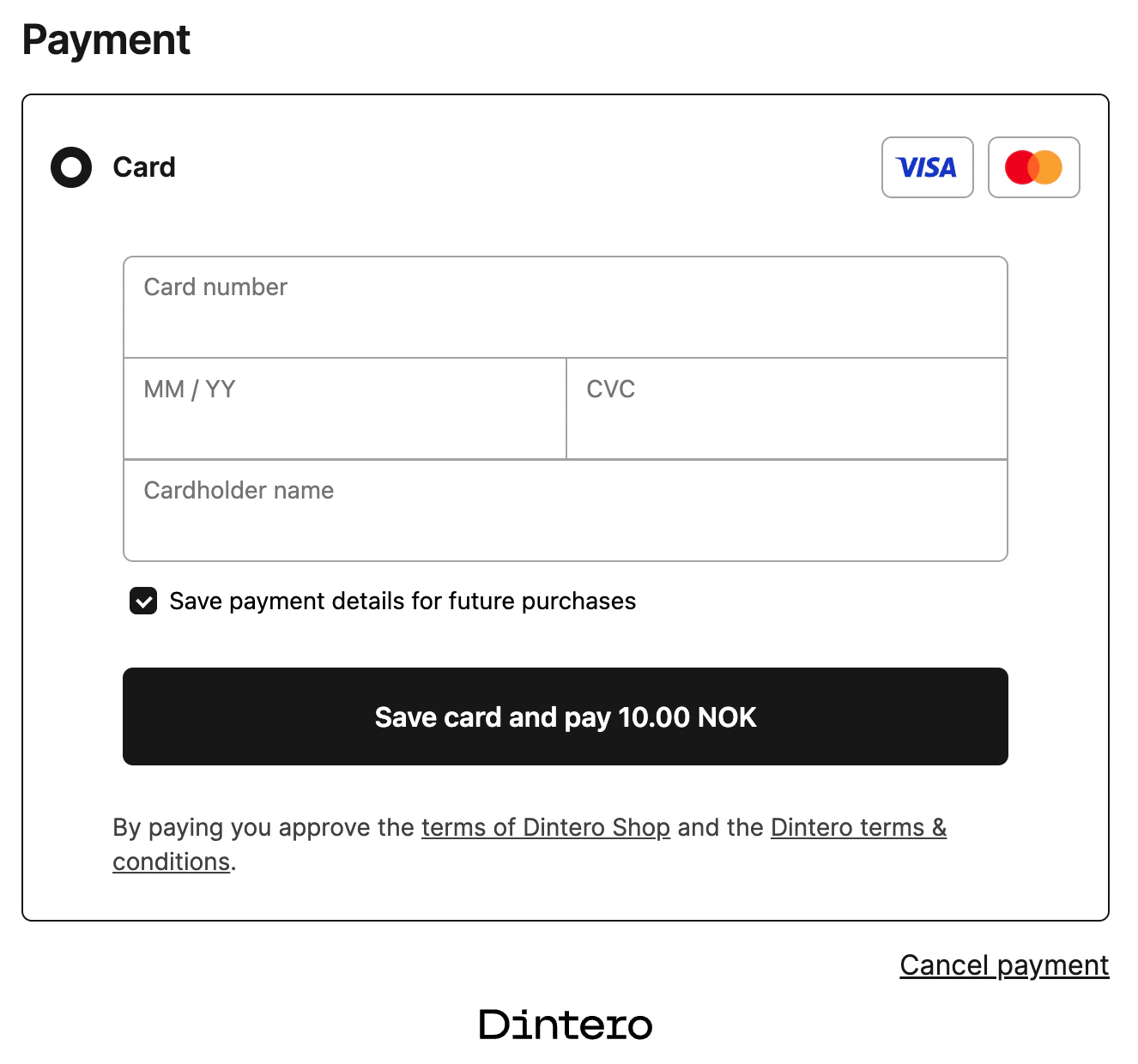 * If `generate_payment_token` is `true` and `generate_payment_token_config` is **omitted**, the card is always tokenized (no checkbox shown).
* `save_card_checkbox: "opt_in"` — the checkbox is **unchecked** by default. The customer must actively check it to save their card.
* `save_card_checkbox: "opt_out"` — the checkbox is **checked** by default. The customer must actively uncheck it to prevent saving.
**opt\_in** — customer must actively choose to save their card:
```json theme={null}
{
"url": {
"return_url": "https://example.com/accept",
"callback_url": "https://example.com/callback?method=GET"
},
"customer": {
"email": "john.doe@example.com",
"phone_number": "+4799999999"
},
"order": {
"amount": 29990,
"currency": "NOK",
"vat_amount": 6000,
"items": [
{
"line_id": "1",
"description": "Stablestol",
"quantity": 1,
"amount": 29990,
"vat_amount": 6000,
"vat": 25
}
],
"merchant_reference": "order-1"
},
"configuration": {
"dintero_psp": {
"creditcard": {
"generate_payment_token": true,
"generate_payment_token_config": {
"save_card_checkbox": "opt_in"
}
}
}
},
"profile_id": "default"
}
```
**opt\_out** — checkbox is checked by default, customer must uncheck to prevent saving:
```json theme={null}
{
"configuration": {
"dintero_psp": {
"creditcard": {
"generate_payment_token": true,
"generate_payment_token_config": {
"save_card_checkbox": "opt_out"
}
}
}
}
}
```
`generate_payment_token` must be set to `true` for `save_card_checkbox` to have any effect.
[create session]: /api-reference/session/checkout_session_profile_post
[payment token session]: /api-reference/session/checkout_payment_token_session_post
* If `generate_payment_token` is `true` and `generate_payment_token_config` is **omitted**, the card is always tokenized (no checkbox shown).
* `save_card_checkbox: "opt_in"` — the checkbox is **unchecked** by default. The customer must actively check it to save their card.
* `save_card_checkbox: "opt_out"` — the checkbox is **checked** by default. The customer must actively uncheck it to prevent saving.
**opt\_in** — customer must actively choose to save their card:
```json theme={null}
{
"url": {
"return_url": "https://example.com/accept",
"callback_url": "https://example.com/callback?method=GET"
},
"customer": {
"email": "john.doe@example.com",
"phone_number": "+4799999999"
},
"order": {
"amount": 29990,
"currency": "NOK",
"vat_amount": 6000,
"items": [
{
"line_id": "1",
"description": "Stablestol",
"quantity": 1,
"amount": 29990,
"vat_amount": 6000,
"vat": 25
}
],
"merchant_reference": "order-1"
},
"configuration": {
"dintero_psp": {
"creditcard": {
"generate_payment_token": true,
"generate_payment_token_config": {
"save_card_checkbox": "opt_in"
}
}
}
},
"profile_id": "default"
}
```
**opt\_out** — checkbox is checked by default, customer must uncheck to prevent saving:
```json theme={null}
{
"configuration": {
"dintero_psp": {
"creditcard": {
"generate_payment_token": true,
"generate_payment_token_config": {
"save_card_checkbox": "opt_out"
}
}
}
}
}
```
`generate_payment_token` must be set to `true` for `save_card_checkbox` to have any effect.
[create session]: /api-reference/session/checkout_session_profile_post
[payment token session]: /api-reference/session/checkout_payment_token_session_post