> ## Documentation Index
> Fetch the complete documentation index at: https://docs.dintero.com/llms.txt
> Use this file to discover all available pages before exploring further.
# Transaction statuses
> Understand what each Dintero transaction status means and which actions are available at each stage.
Dintero transactions move through a fixed set of statuses from the moment a customer initiates payment. Use this page as a reference for what each status means and what you can do next.
## Status flow
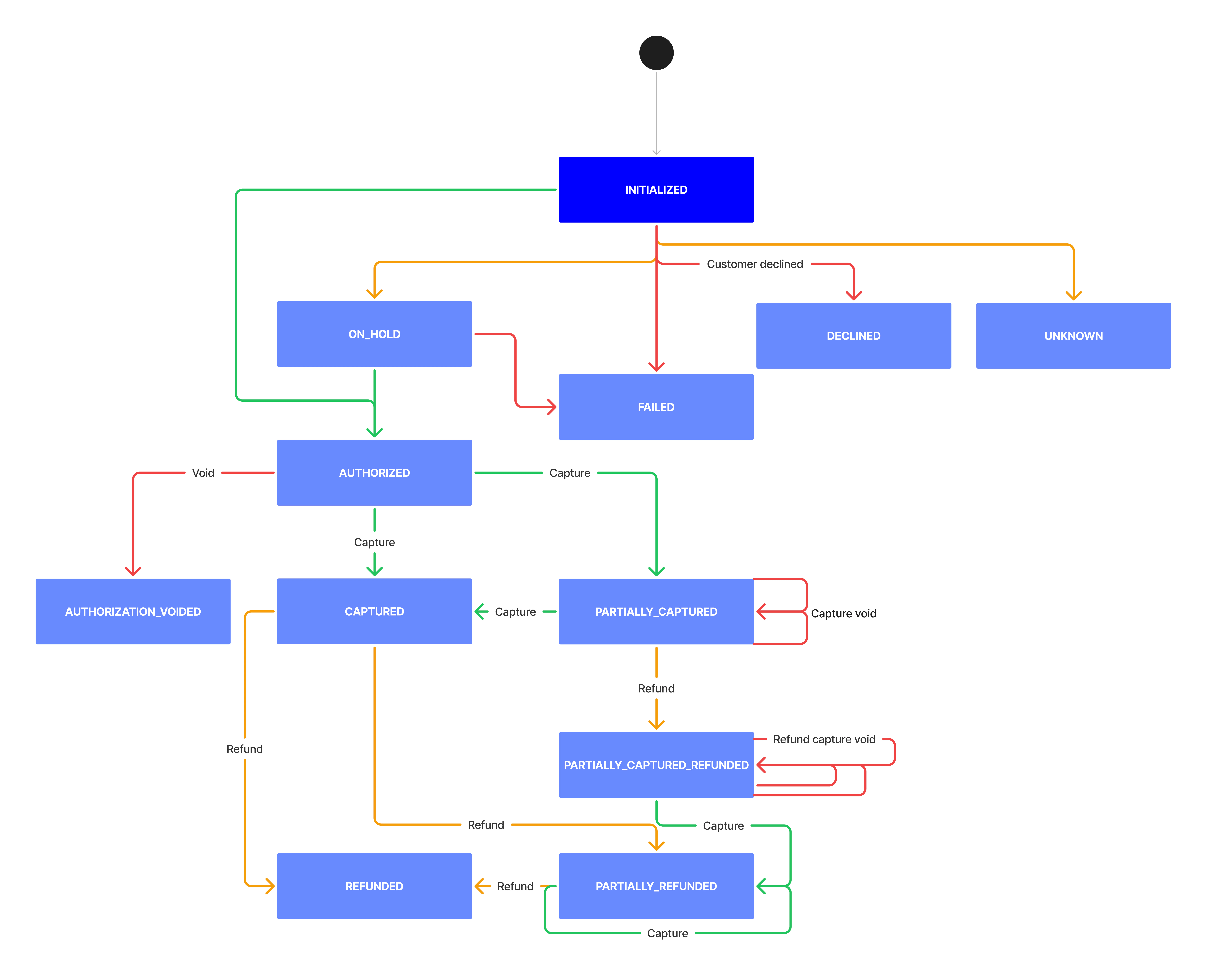 ## Status reference
| Status | API value | Description | Available actions |
| -------------------------------------- | ----------------------------- | --------------------------------------------------------------------- | -------------------------------------------------------------------- |
| Initialized | `initialized` | Customer initiated payment | — |
| On hold | `on_hold` | Held for manual review (Walley only) | — |
| Authorized | `authorized` | Payment approved, funds not yet captured | Capture, partial capture, cancel |
| Partially captured | `partially_captured` | Part of the authorized amount captured | Capture remaining, partial capture, partial refund, cancel remaining |
| Partially captured, partially refunded | `partially_captured_refunded` | Part captured and part refunded on the same order | Refund, capture remaining |
| Captured | `captured` | Full authorized amount captured | Refund, partial refund |
| Cancelled | `authorization_voided` | Authorization voided, cannot be reversed | — |
| Partially refunded | `partially_refunded` | Part of the paid amount refunded (1–3 business days) | Refund, partial refund |
| Refunded | `refunded` | Full amount refunded to the customer (1–3 business days) | — |
| Declined | `declined` | Customer actively declined the payment (e.g., dismissed a Vipps push) | — |
| Failed | `failed` | Payment failed for technical reasons; customer must retry | — |
| Unknown | `unknown` | Payment outcome could not be determined | — |
## WooCommerce status mapping
| Dintero status | WooCommerce status |
| -------------------------------------- | ------------------ |
| Initialized | Awaiting payment |
| On hold | Manual review |
| Authorized | Processing |
| Partially captured | Completed |
| Partially captured, partially refunded | Completed |
| Captured | Completed |
| Cancelled | Cancelled |
| Partially refunded | Completed |
| Refunded | Refunded |
| Declined | Cancelled |
| Failed | Cancelled |
| Unknown | Cancelled |
## Common mistakes
An order with status **Authorized** has not been captured yet. Cancel it instead. The customer has not been charged, so there is nothing to refund.
If you need to remove items before capture, adjust the order lines and capture only the updated amount. The customer is then charged only for what you ship.
See [Capture orders](/docs/integrations/support/partial-capture) for how to do this in WooCommerce.
See [Common order handling mistakes](/docs/integrations/support/common-mistakes) for more.
## Status reference
| Status | API value | Description | Available actions |
| -------------------------------------- | ----------------------------- | --------------------------------------------------------------------- | -------------------------------------------------------------------- |
| Initialized | `initialized` | Customer initiated payment | — |
| On hold | `on_hold` | Held for manual review (Walley only) | — |
| Authorized | `authorized` | Payment approved, funds not yet captured | Capture, partial capture, cancel |
| Partially captured | `partially_captured` | Part of the authorized amount captured | Capture remaining, partial capture, partial refund, cancel remaining |
| Partially captured, partially refunded | `partially_captured_refunded` | Part captured and part refunded on the same order | Refund, capture remaining |
| Captured | `captured` | Full authorized amount captured | Refund, partial refund |
| Cancelled | `authorization_voided` | Authorization voided, cannot be reversed | — |
| Partially refunded | `partially_refunded` | Part of the paid amount refunded (1–3 business days) | Refund, partial refund |
| Refunded | `refunded` | Full amount refunded to the customer (1–3 business days) | — |
| Declined | `declined` | Customer actively declined the payment (e.g., dismissed a Vipps push) | — |
| Failed | `failed` | Payment failed for technical reasons; customer must retry | — |
| Unknown | `unknown` | Payment outcome could not be determined | — |
## WooCommerce status mapping
| Dintero status | WooCommerce status |
| -------------------------------------- | ------------------ |
| Initialized | Awaiting payment |
| On hold | Manual review |
| Authorized | Processing |
| Partially captured | Completed |
| Partially captured, partially refunded | Completed |
| Captured | Completed |
| Cancelled | Cancelled |
| Partially refunded | Completed |
| Refunded | Refunded |
| Declined | Cancelled |
| Failed | Cancelled |
| Unknown | Cancelled |
## Common mistakes
An order with status **Authorized** has not been captured yet. Cancel it instead. The customer has not been charged, so there is nothing to refund.
If you need to remove items before capture, adjust the order lines and capture only the updated amount. The customer is then charged only for what you ship.
See [Capture orders](/docs/integrations/support/partial-capture) for how to do this in WooCommerce.
See [Common order handling mistakes](/docs/integrations/support/common-mistakes) for more.