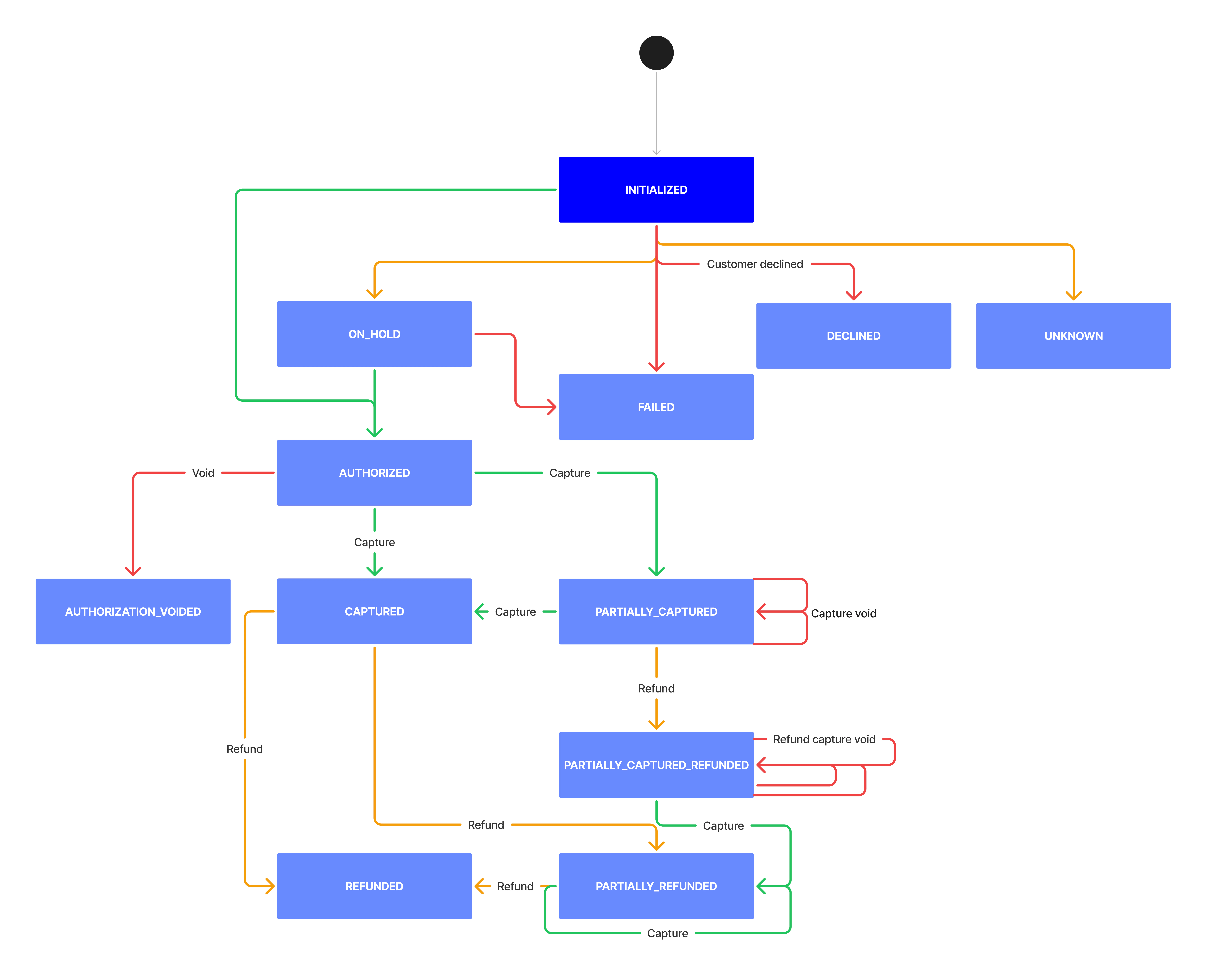
Status flow

Status reference
| Status | API value | Description | Available actions |
|---|---|---|---|
| Initialized | initialized | Customer initiated payment | — |
| On hold | on_hold | Held for manual review (Walley only) | — |
| Authorized | authorized | Payment approved, funds not yet captured | Capture, partial capture, cancel |
| Partially captured | partially_captured | Part of the authorized amount captured | Capture remaining, partial capture, partial refund, cancel remaining |
| Partially captured, partially refunded | partially_captured_refunded | Part captured and part refunded on the same order | Refund, capture remaining |
| Captured | captured | Full authorized amount captured | Refund, partial refund |
| Cancelled | authorization_voided | Authorization voided, cannot be reversed | — |
| Partially refunded | partially_refunded | Part of the paid amount refunded (1–3 business days) | Refund, partial refund |
| Refunded | refunded | Full amount refunded to the customer (1–3 business days) | — |
| Declined | declined | Customer actively declined the payment (e.g., dismissed a Vipps push) | — |
| Failed | failed | Payment failed for technical reasons; customer must retry | — |
| Unknown | unknown | Payment outcome could not be determined | — |
WooCommerce status mapping
| Dintero status | WooCommerce status |
|---|---|
| Initialized | Awaiting payment |
| On hold | Manual review |
| Authorized | Processing |
| Partially captured | Completed |
| Partially captured, partially refunded | Completed |
| Captured | Completed |
| Cancelled | Cancelled |
| Partially refunded | Completed |
| Refunded | Refunded |
| Declined | Cancelled |
| Failed | Cancelled |
| Unknown | Cancelled |
Common mistakes
Refunding an authorized order
Issuing a partial refund before capture
If you need to remove items before capture, adjust the order lines and capture only the updated amount. The customer is then charged only for what you ship.See Capture orders for how to do this in WooCommerce.